
iPlc - Android Modbus HMI2.0.1 - Get APK
You'll be able to download in few seconds.
Publisher Description
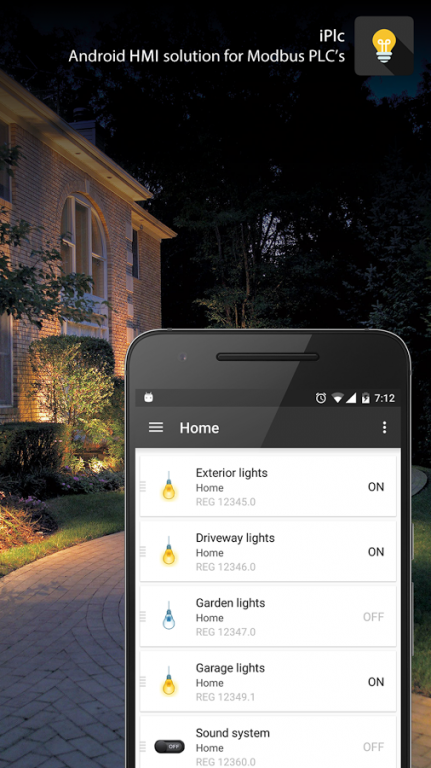
Gone are the days when you couldn't find a good and stable app to connect to your plc.
I present to you: iPlc - Android Modbus HMI
The most simple and reliable HMI solution for your Modbus plc.
Features:
- Works with any Modbus plc: Wago, Twido, Zelio and many others
- Connects to the plc using the Modbus protocol over TCP/IP
- Reads from Input Status (Digital input), Input Register (Analog input)
- Reads and writes from Coils (Digital output), Holding Registers (Memory)
- Reads boolean, bit values, 16 bit / 32 bit integers.
- Supports multiple plc configurations
- Supports Input Register modifier formula (to alter sensor output)
- Highly configurable - you create and manage your plc's and addresses
- Reads values each 2 seconds from the plc to keep the information live on the screen
- 40 ms read time, 70 ms write time over local network
- A few dozen icons to customize your interface
- Material design
How it works:
The app connects to the Plc and can read/write values in and from the Modbus registers.
How to set it up:
- Install iPlc
- Set up your plc using the Ip and Port
- Two addresses will be created by default. See if the configuration works.
- Make sure to be on the same network with your plc or use static ip / port routing.
- Profit!
Once configured, it's fast and reliable.
Works on any Modbus plc. Developed and tested using a WAGO 750-881 PLC.
Try it out and let me know what you think.
Basic version supports two addresses for testing purposes.
If it works for you and you find it reliable, consider unlocking it to support the project.
About iPlc - Android Modbus HMI
The company that develops iPlc - Android Modbus HMI is Andrew L.. The latest version released by its developer is 2.0.1.
To install iPlc - Android Modbus HMI on your Android device, just click the green Continue To App button above to start the installation process. The app is listed on our website since 2015-11-22 and was downloaded 0 times. We have already checked if the download link is safe, however for your own protection we recommend that you scan the downloaded app with your antivirus. Your antivirus may detect the iPlc - Android Modbus HMI as malware as malware if the download link to i.plc is broken.
How to install iPlc - Android Modbus HMI on your Android device:
- Click on the Continue To App button on our website. This will redirect you to Google Play.
- Once the iPlc - Android Modbus HMI is shown in the Google Play listing of your Android device, you can start its download and installation. Tap on the Install button located below the search bar and to the right of the app icon.
- A pop-up window with the permissions required by iPlc - Android Modbus HMI will be shown. Click on Accept to continue the process.
- iPlc - Android Modbus HMI will be downloaded onto your device, displaying a progress. Once the download completes, the installation will start and you'll get a notification after the installation is finished.
Program Details
System requirements
Download information
Pricing
Version History
version 2.0.1
posted on 2015-11-22
iPlc - Version 2.0.1,- Minor bug fix,iPlc - Version 2.0,IMPORTANT: If you are upgrading from version 1.0 make sure to clear the app's data before starting it - otherwise you'll need to configure the app manually (no first start wizard configurator).,- Brand new app,- Fully-fledged support for all Modbus functions (not only Holding Register),- Support for single bit, 16bit/32bit integer read / write,- Multiple plc support on the same screen,- List / Grid view,- Material design
Disclaimer
External Download
We do not host iPlc - Android Modbus HMI on our servers. We did not scan it for viruses, adware, spyware or other type of malware. This app is hosted by Galad and passed their terms and conditions to be listed there. We recommend caution when installing it.
The APK Download link for iPlc - Android Modbus HMI is provided to you by apps112.com without any warranties, representations or guarantees of any kind, so access it at your own risk.
If you have questions regarding this particular app contact the publisher directly. For questions about the functionalities of apps112.com contact us.
